

Save Recipes from Any Website, TikTok, or Instagram — and Keep Them Forever
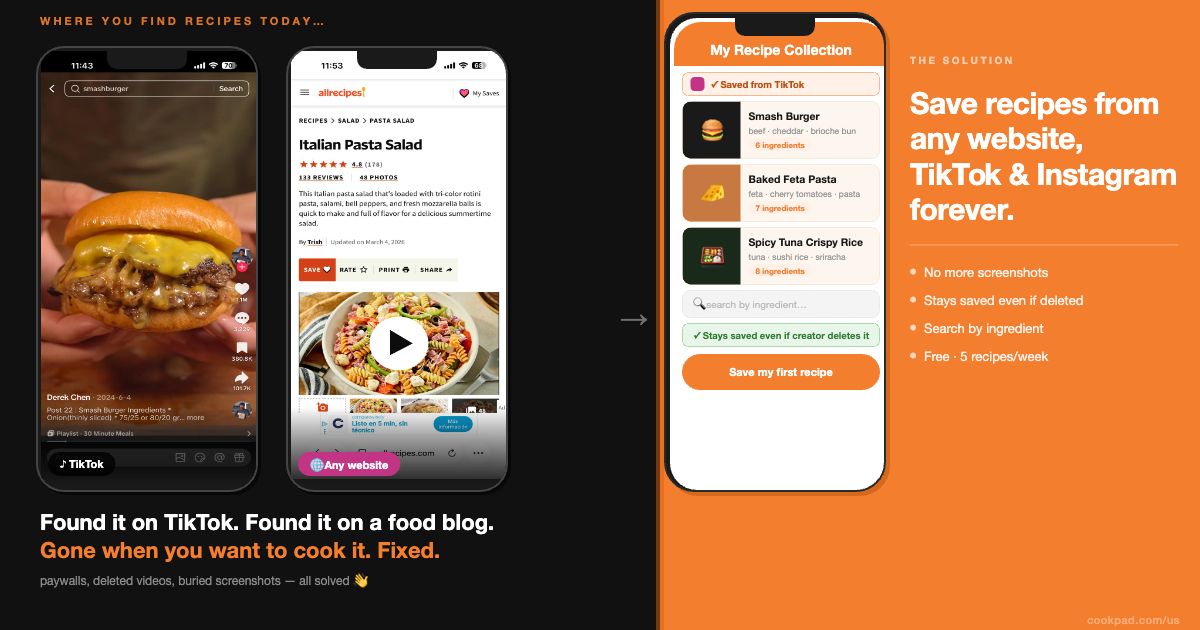
You found the perfect baked feta pasta recipe on TikTok — the one from a creator you’d never seen before, with the exact ratio of cherry tomatoes to feta that finally made it work. You watched it twice, thought I’ll come back to this, and kept scrolling. Three days later, when you actually wanted to make it, it was gone. Down the rabbit hole of your saved posts, buried under 200 other things, or worse — the creator deleted the video entirely.
This happens constantly on FoodTok, and bookmarks and screenshots don’t fix it.
Here’s the direct answer: To save a recipe from any website, TikTok, or Instagram, tap Share on the post or page and select Cookpad — or paste the URL directly in the app. Cookpad automatically extracts the ingredients and steps, stores the recipe in your personal collection, and keeps it there permanently, even if the original video or page disappears. The whole process takes under two minutes.
The rest of this guide walks you through exactly how to do it — and how to organize everything so you can actually find recipes when you want to cook them.
→ Tap here to save your first recipe to Cookpad.
Key Features:
- Why screenshots and saved posts keep failing you
- What Cookpad does differently when you save a recipe
- Step-by-step: how to save a recipe from TikTok, Instagram, or any website
- How to organize your Recipe Collection so you can find anything fast
- Why this changes how you cook at home
- FAQ
Why Screenshots and Saved Posts Keep Failing You
You already have a system for saving recipes. The problem is it doesn’t work.
- Instagram’s saved posts search only reads captions — not ingredients. If you saved a Reel where the creator listed the ingredients on-screen but never typed them in the caption, you can’t search for it. Type “feta” in your saved posts and anything without that word in the caption won’t show up. And if the creator deletes the Reel, the saved post disappears with it.
- Screenshots pile up and become unsearchable. Your camera roll turns into a graveyard of recipe photos mixed with everything else on your phone. You know the recipe is in there somewhere. Finding it when you’re standing at the stove is a different story.
- Browser bookmarks break. A food blog moves its recipes behind a paywall. A creator’s website goes down. A link you saved six months ago now opens to a 404 page. The recipe is gone and you have no copy.
- TikTok’s favorites are algorithmic, not personal. The app is built for discovery, not long-term storage. Videos get removed, accounts get deleted, and your curated list of saved cooking videos can vanish without warning.
The real problem isn’t that you’re not saving — it’s that none of these systems were built to keep recipes. They were built to keep links.
What Cookpad Does Differently When You Save a Recipe
When you save a recipe to Cookpad, the app reads the full page or video, extracts the ingredients and steps, and stores a complete copy in your personal collection. The original link can disappear tomorrow and your recipe is still there, exactly as you saved it.
Here’s what that looks like in practice:
Search your collection by ingredient — not just by title
Once a recipe is saved to Cookpad, it becomes part of a searchable personal library. Type “salmon” and every recipe in your collection that uses salmon appears — not just the ones with “salmon” in the title. This is the difference between a bookmark and an actual recipe manager.
If you’ve ever watched a spicy tuna crispy rice video on TikTok and couldn’t remember which creator made it or what they called it, this is how you find it again.
Your screen stays on while you cook
Cookpad’s cooking mode keeps your phone screen active while you’re following a recipe — no more tapping the screen with floury hands every 30 seconds to stop it from going dark. Each step is displayed clearly, full screen, so you can read from across the counter.
Jump back to the original video from inside the recipe
When you save a recipe from a TikTok or Instagram Reel, Cookpad stores the link to the original. Tap it anytime to watch the creator’s technique — the folding method, the plating, the exact texture you’re going for. The video reference stays attached to the recipe even after it’s been imported.
The recipe stays even if the creator deletes the video
This is the part most recipe savers don’t offer. When you save a recipe to Cookpad, you’re saving the content — not just the link. If @2peoplecooking removes a video, or a food blog shuts down, or an Instagram account goes private, your recipe stays in your collection untouched.
Have a TikTok video you don’t want to lose? → Save it now to your Cookpad collection — it’s free
Edit and personalize the recipe after saving
Cookpad isn’t a read-only archive. Once a recipe is in your collection, you can edit it — swap an ingredient, adjust the serving size, add a note about what you changed. Your version of the cottage cheese cookie dough with extra vanilla extract lives right there next to the original steps.
Step-by-Step: How to Save a Recipe from TikTok, Instagram, or Any Website
There are two easy ways to import recipes:
1. Share directly from websites/social media platforms
- Tap Share on the webpage or social media post. ⚠️ The sharing function is designed differently for each platform. The screenshot below uses Instagram as an example.
- Select Cookpad from the sharing options.
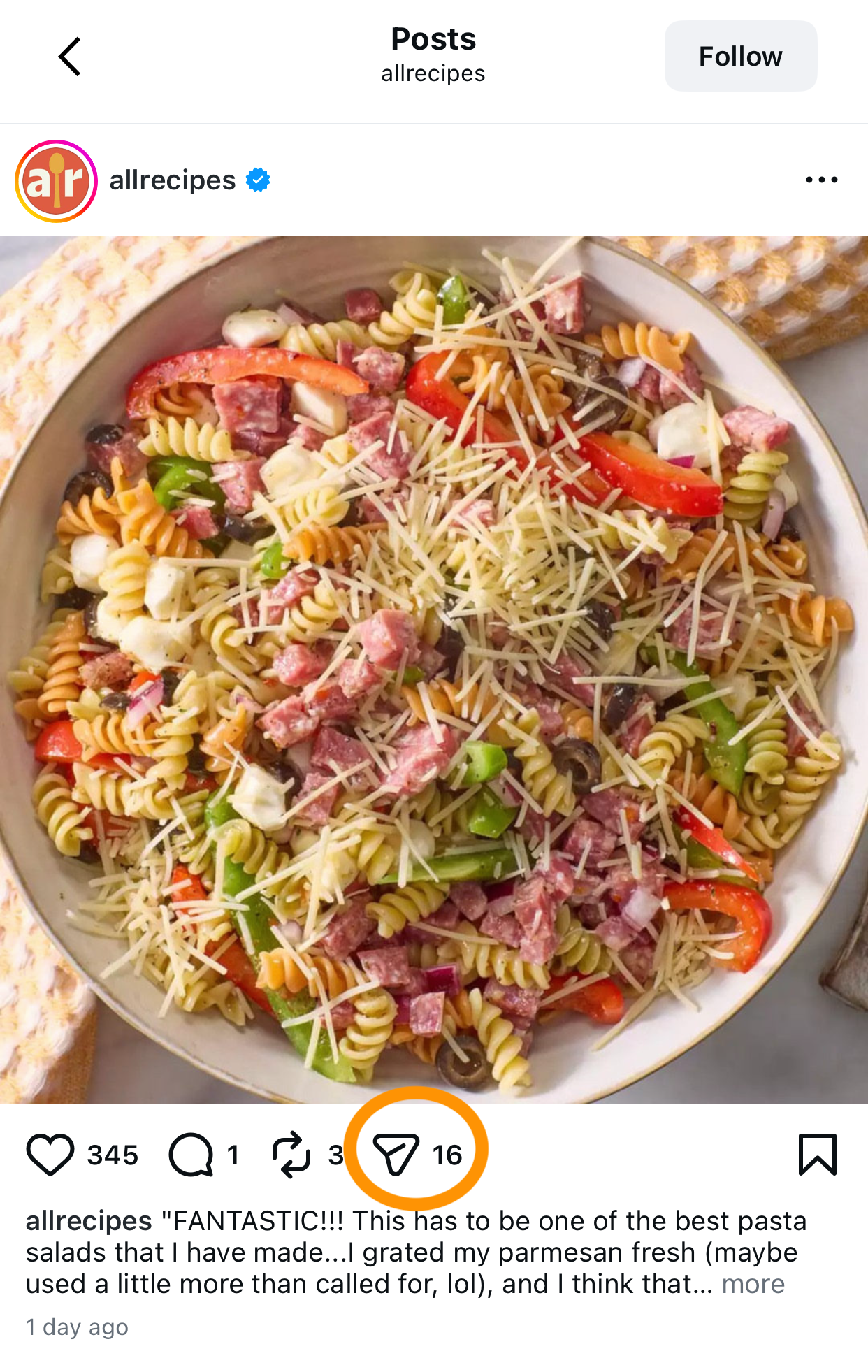
Share recipe from Instagram to Cookpad using share menu - Select Cookpad from share options to save recipe
2. Paste the link in Cookpad
- Copy the link to the recipe webpage or social media post.
- Open the Cookpad app and tap the ”+” icon to add a new recipe.
- Select “Import from social media”.
- Paste the recipe link. Once the recipe loads, tap Import.
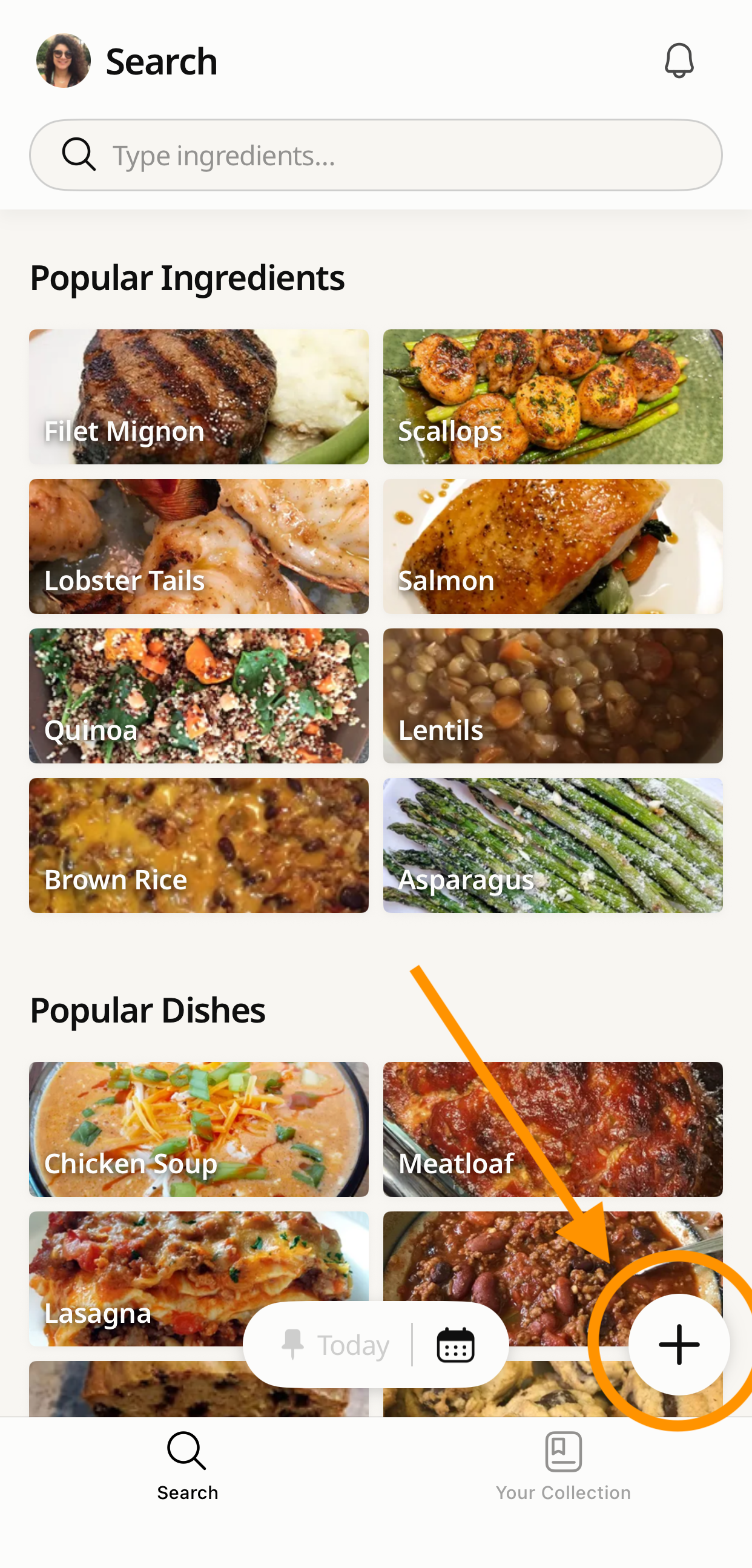
Copy recipe link to import into Cookpad app - Paste recipe URL in Cookpad import from social media - Recipe loading in Cookpad after URL paste
After the recipe finishes loading, tap Start Importing Recipe.
The import process usually takes 1–2 minutes. We recommend enabling app notifications so you’ll be notified when the import is complete.
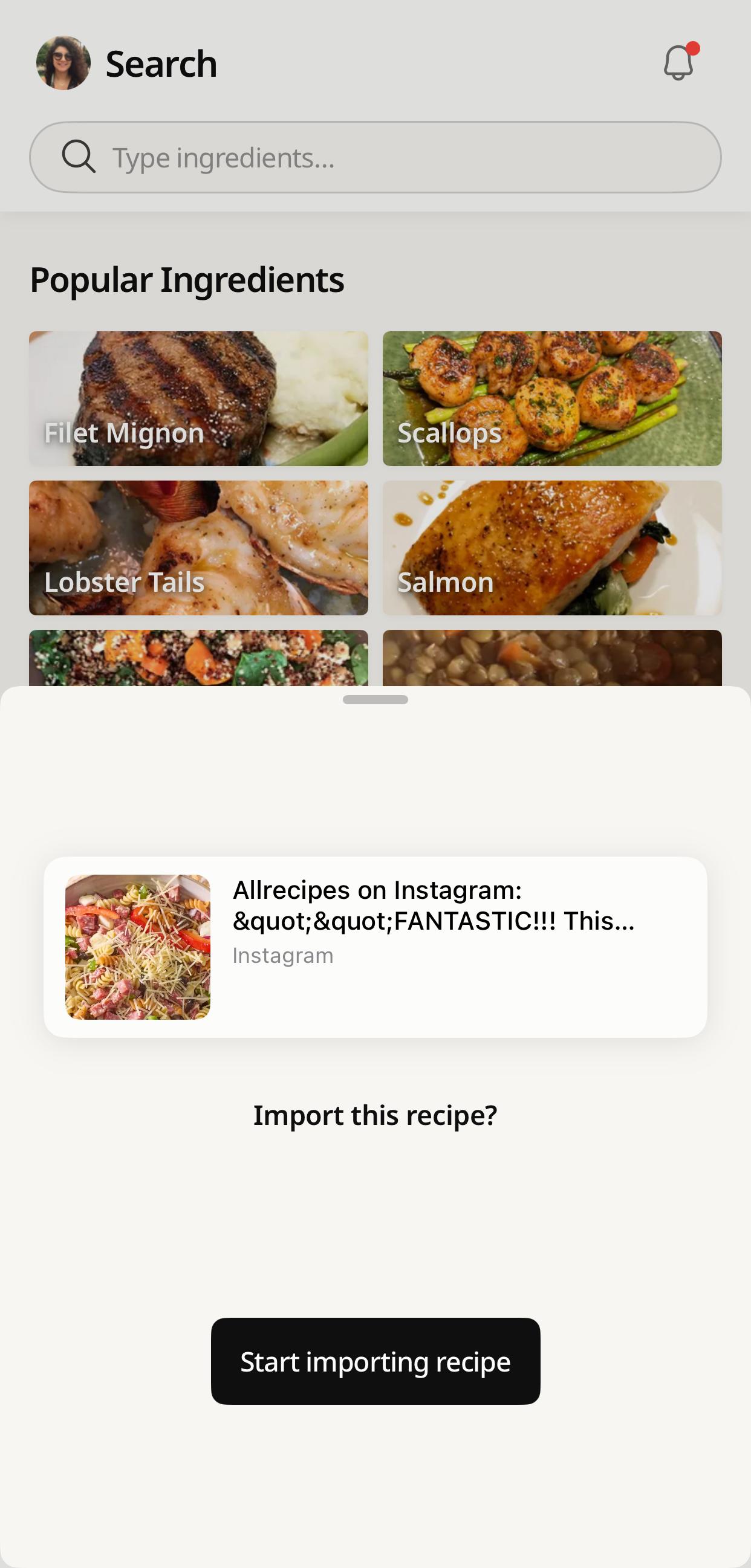
Tap Start Importing Recipe - Cookpad recipe import processing notification - Recipe imported successfully to Cookpad collection
You can also import recipes in other languages. Cookpad will automatically translate imported recipes into English, making it easy to cook dishes from around the world.
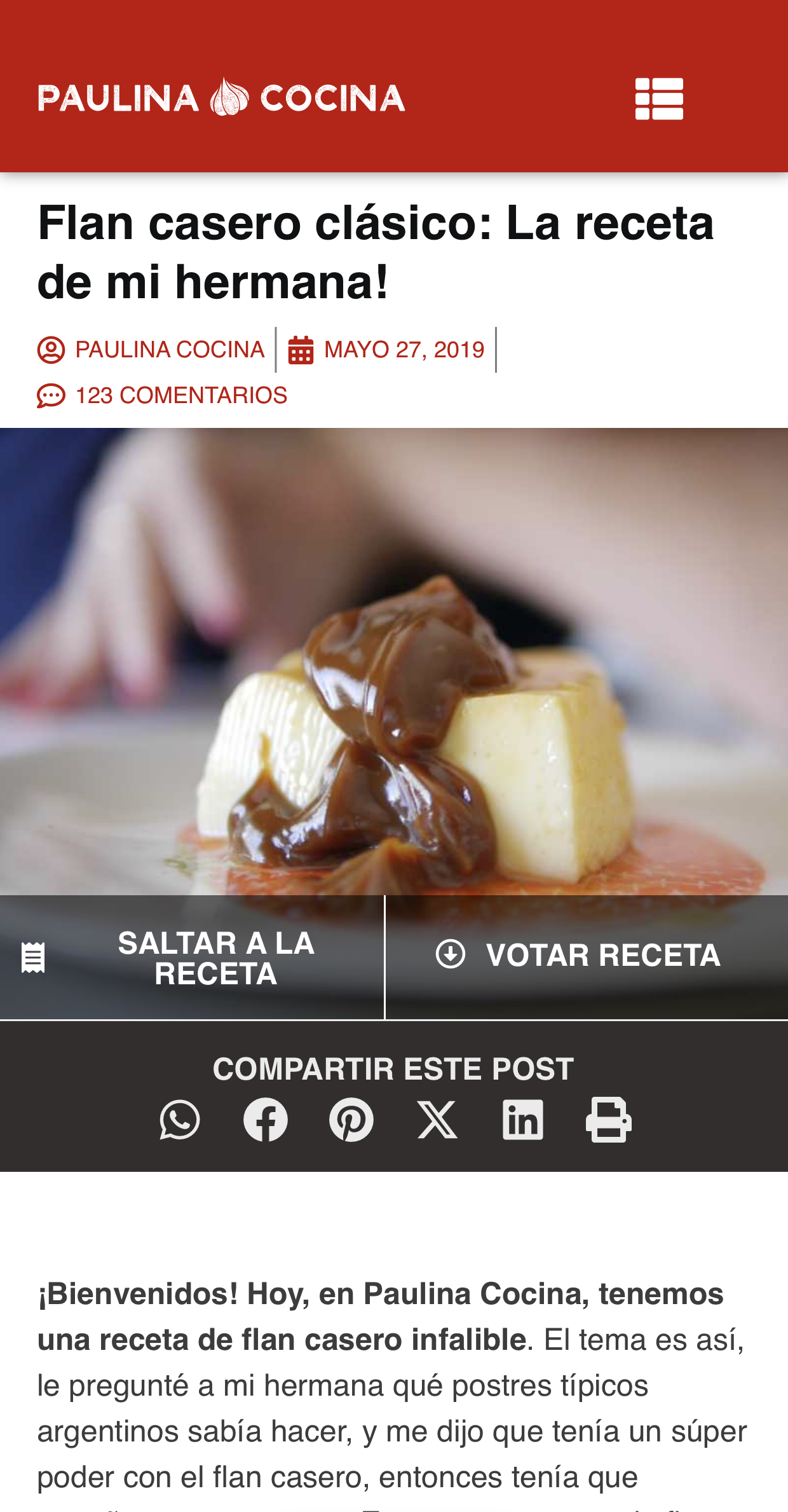
Import recipe in Spanish - Cookpad translating imported recipe to English - Translated recipe saved in Cookpad collection
All imported recipes will be saved in the “ Imported” folder in Your Recipe Collection for easy access.This feature helps you manage all your favorite recipes in the Cookpad app and keep them easy to access while cooking.
⚠️ Imported recipes can be “corrected”, but they cannot be published publicly. They are for personal use only.
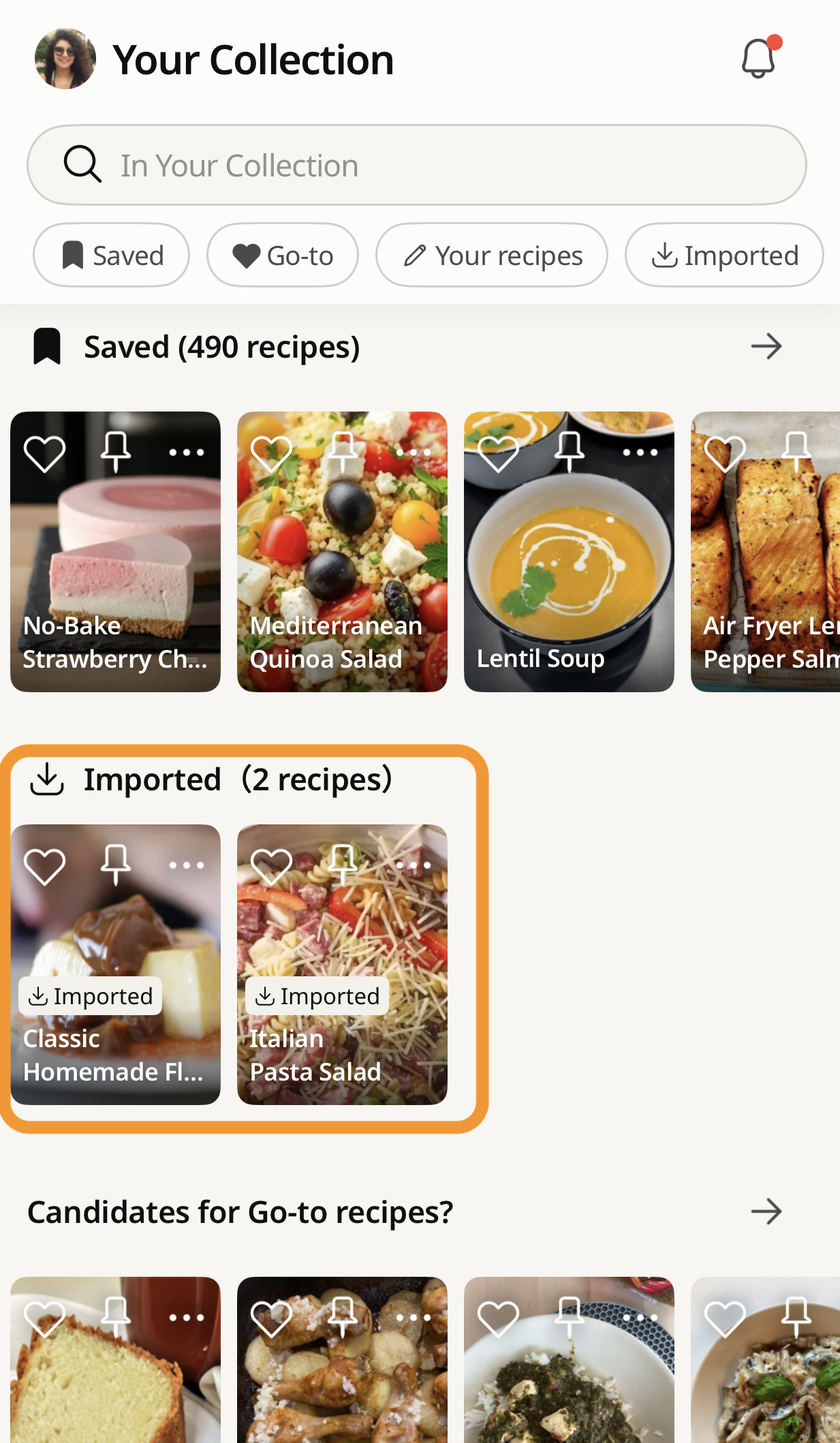
Imported recipes saved in Cookpad Imported folder personal collection - Cookpad Imported folder showing saved recipes from social media
How to Organize Your Recipe Collection So You Can Find Anything Fast
Saving recipes is only half the equation. The other half is being able to find them on a Tuesday night at 6pm when you’re deciding what to make for dinner.
Cookpad stores all your imported recipes in the Imported folder inside Your Recipe Collection. From there, you can build themed collections to sort everything the way your brain actually works.
A few collection ideas to get you started — especially useful heading into summer grilling season:
- 4th of July BBQ — smash burgers, grilled corn, potato salad, anything cookout-ready
- 30-Minute Weeknights — fast recipes for nights when you don’t have the bandwidth
- FoodTok Saves — everything you imported from TikTok, in one place
- Meal Prep Sunday — batch-cooking recipes organized for the week ahead
- Husband/Kid Approved — the recipes that actually got eaten without complaints
- Trying This Week — a running list of what’s next in the rotation
- Snacks & Appetizers — for game days, gatherings, or just the 4pm hunger hit
The ability to create and organize unlimited themed collections is part of Cookpad Premium. The free plan gives you access to the Imported folder and basic saving features to get started.
Your collection starts with the first recipe. → Save from TikTok, Instagram, or any website — right now
Why This Changes How You Cook at Home
There’s a reason home cooks in the US have kept recipe boxes, index cards, and 3-ring binders for generations — the idea that a recipe worth making is worth keeping. The problem with the digital version of that instinct is that it’s been spread across a dozen different places: a Pinterest board you haven’t opened since 2022, a camera roll full of screenshots, a Notes app link that 404s.
Cookpad brings the logic of that old recipe box into the format where recipes actually live now — short videos, food blogs, Instagram Reels — and makes them permanent, searchable, and yours.
Cookpad is the world’s largest recipe-sharing platform, with millions of recipes shared by home cooks every day. The import feature extends that into the rest of the internet, so wherever you find a recipe worth making, you have a place to keep it that actually works.
★ Try it now
Save recipes from anywhere.
Keep them forever.
TikTok, Instagram, food blogs — one tap and it’s yours. Even if the original disappears.
Save My First Recipe
FAQ
How do I save a recipe from a website to my phone without copy-pasting anything? Copy the URL of the recipe page, open Cookpad, tap the + button, select “Import from social media,” paste the link, and tap Import. Cookpad automatically reads the page and extracts the ingredients and steps — no manual entry required. The recipe saves to your Imported folder in your Recipe Collection.
What happens if the creator deletes the TikTok video I saved? Nothing happens to your saved recipe. When you import a recipe to Cookpad, the app saves the content — the ingredients, steps, and images — not just a link to the original. If the creator deletes their video or account, your recipe stays in your Cookpad collection exactly as it was when you saved it.
Can I search a saved recipe by ingredient? Yes. Every recipe saved to Cookpad becomes part of your searchable personal collection. You can search by ingredient name — type “chickpeas” and every recipe in your collection that includes chickpeas will appear, regardless of what the recipe is called. This works across all imported recipes, not just ones you found on Cookpad.
Are the recipes I save from TikTok or Instagram published publicly on Cookpad? No. Imported recipes are saved privately to your personal Recipe Collection and are marked as imported. They cannot be published publicly on Cookpad. They are for your personal use only.
Is it free to save recipes from TikTok or Instagram on Cookpad? The free plan lets you save recipes from social media and websites, with access to your Imported folder. Unlimited saves and the ability to organize recipes into unlimited themed collections require Cookpad Premium. Both options are available — start with the free plan and upgrade if you want more.